
1Getting started: quick design
RodLab needs no installation and no account. Open the app; it starts with the worked example of API RP 11L loaded (a 5,000 ft well, 2-3/8 in tubing, fluid level at 4,500 ft, specific gravity 0.9). The tabs along the top are the steps of the work, and the sidebar on the left holds the well you are working on and the display units.
- Open the Quick design tab.
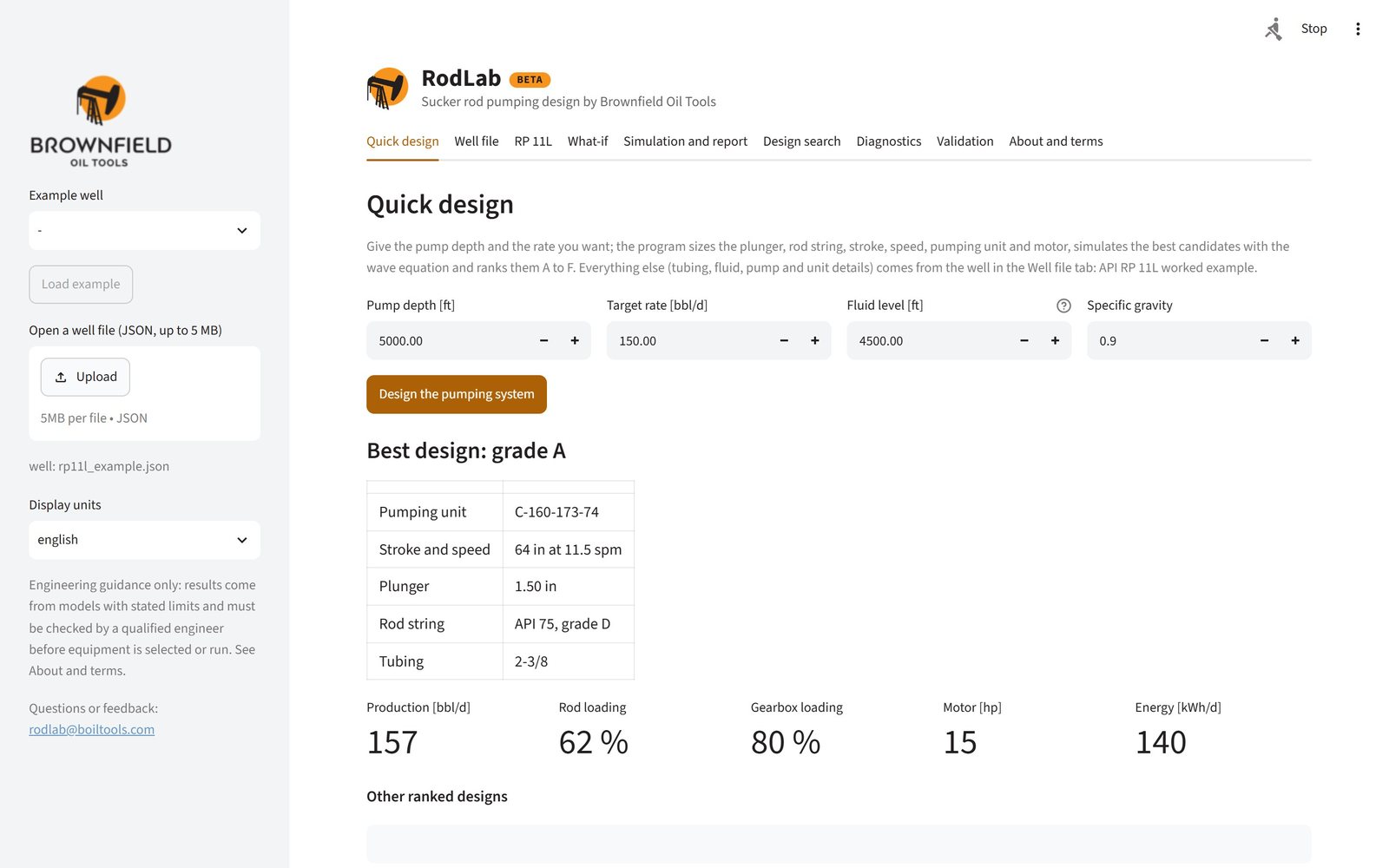
- Enter the pump depth, the target rate, the producing fluid level (measured from surface; at the pump depth for a pumped-off well) and the specific gravity of the fluid. When the well file has an inflow model, the fluid level is solved from it instead.
- Click Design the pumping system. RodLab sizes the plunger, rod string, stroke, speed, pumping unit and motor, simulates the best candidates with the wave equation and ranks them. This takes 10 to 60 seconds.
- Read the best design: the pumping unit, stroke and speed, plunger, rod string and tubing, with its grade, production, rod and gearbox loadings, motor size and daily energy. The table below it lists the other ranked designs.
- Keep the result: Download the best design as a well file saves it to your computer, and Open the best design in the other tabs makes it the current well, so you can simulate it, print its report or change it in What-if.
Everything else the design needs (tubing size, pump and pumping unit details, rod grade, motor type) comes from the well in the Well file tab. To design your own well, change it there first, or load your own file.
Engineering guidance only. RodLab's results come from models with stated limits. A qualified engineer must check them before equipment is selected or run. See the known limitations.
2The well file
Every calculation in RodLab starts from one well file: a small JSON document with the well, fluid, rods, pump and surface equipment. The tabs all work on the same well, which the sidebar names (for example well: rp11l_example.json).
Loading a well
- Example well (sidebar): choose one and click Load example. rp11l_example is the API RP 11L worked example, deviated_example the same well in a directional hole, diagnostic_example the well behind the example dynamometer card, si_example a well in SI units and cameo14_vogel a well with a Vogel inflow model.
- Open a well file (sidebar): upload a JSON well file (up to 5 MB) and click Load the uploaded file. RodLab checks it first and tells you which value is wrong if it cannot use it.
- Download the well file (bottom of the Well file tab) saves the current well, with your changes, to your computer.
Editing the well
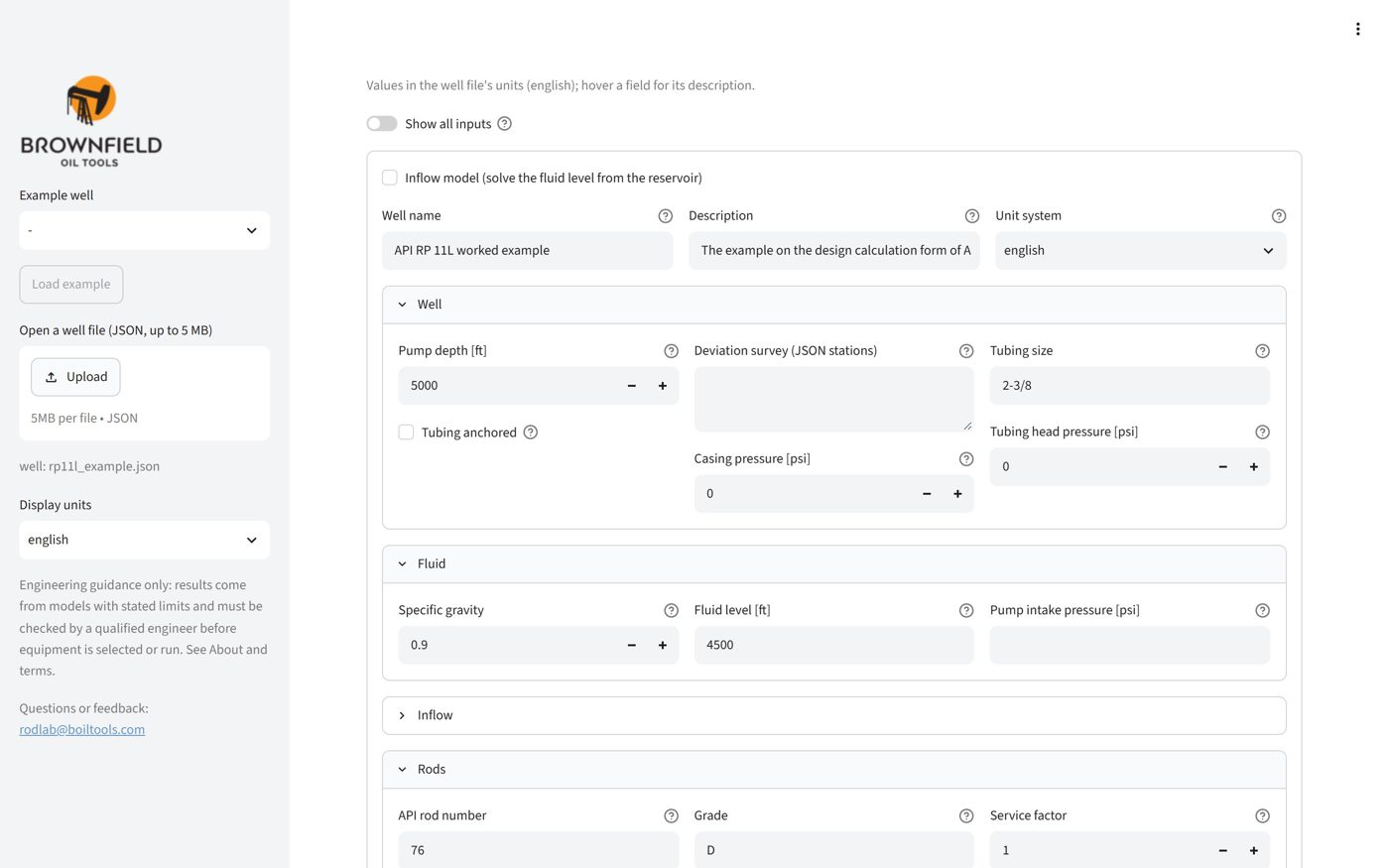
The Well file tab shows the inputs as a form, grouped into Well, Fluid, Inflow, Rods, Pump and Surface. Hover the ? next to a field for its description. Values are in the well file's own units (the Unit system field), whatever the display units in the sidebar.
- By default the form shows the main inputs and every field the file sets. Switch on Show all inputs for the rest (simulation settings, inertia, rod guides, scoring limits and more).
- Tick Inflow model to solve the fluid level from the reservoir instead of entering it.
- Click Apply changes: the well is checked and, if it is valid, becomes the current well in every tab. If a value is not accepted, the message starts with not applied and names the field.
- Raw JSON shows the whole file as text, to edit it directly or paste one in, then Apply JSON.
The main inputs
| Input | What to enter |
|---|---|
| Pump depth | Measured depth of the pump. In a deviated well RodLab uses the survey for the true vertical depth. |
| Deviation survey | Survey stations as [measured depth, inclination, azimuth]; empty for a vertical well (see Deviated wells). |
| Tubing size, anchored | 1.900, 2-3/8, 2-7/8, 3-1/2, 4 or 4-1/2; tick anchored when a tubing anchor holds it (no tubing stretch). |
| Tubing head and casing pressure | Surface pressures; they add to the fluid load and the pump intake pressure. |
| Specific gravity | Of the produced fluid (water 1.0). |
| Fluid level or pump intake pressure | The producing fluid level from surface, or the pressure at the pump intake. Or leave both and use an inflow model (productivity index, Vogel or Fetkovich). |
| API rod number | A rod string from API RP 11L Table 4.1 (44 to 1010), for example 76 for a 7/8 in and 3/4 in string. Explicit taper sections can be given instead. |
| Rod grade, service factor | Grade C, K, D or HS. Service factor 1.0 for non-corrosive service; 0.65 to 0.9 for corrosive fluids. |
| Plunger, pump model | Plunger diameter, and the pump model: full (the pump fills completely) or pressure (fillage from the gas fraction and the dead space). |
| Stroke, speed, pumping unit | Polished rod stroke length, strokes per minute, and the unit designation such as C-228-213-86. |
| Motor | Motor type: NEMA D, C or B, or ultra-high-slip. |
| Target rate | The production you want; designs are graded against it. |
A minimal well file looks like this:
{
  "name": "API RP 11L worked example", "units": "english",
  "well": {"pump_depth": 5000, "tubing": {"size": "2-3/8", "anchored": false}},
  "fluid": {"specific_gravity": 0.9, "fluid_level": 4500},
  "rods": {"rod_number": "76", "grade": "D", "service_factor": 1.0},
  "pump": {"plunger_diameter": 1.5, "volumetric_efficiency": 1.0},
  "surface": {"stroke_length": 54, "spm": 16, "motor": {"type": "nema_d"}},
  "scoring": {"target_rate": 150}
}
Inputs you leave out take sensible defaults, for example a damping factor of 0.1 and a rod-tubing friction coefficient of 0.2.
3RP 11L, what-if and simulation
RP 11L
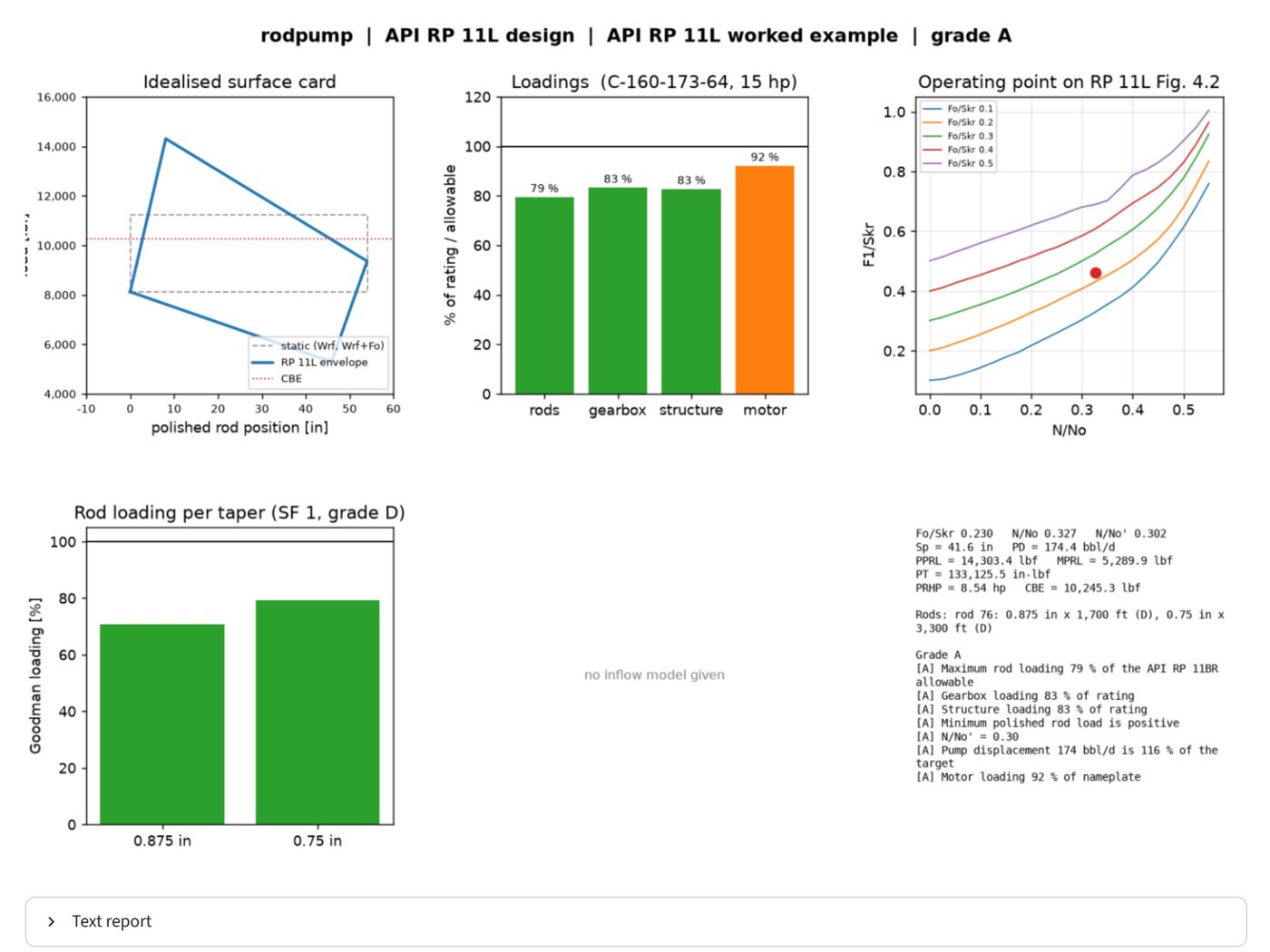
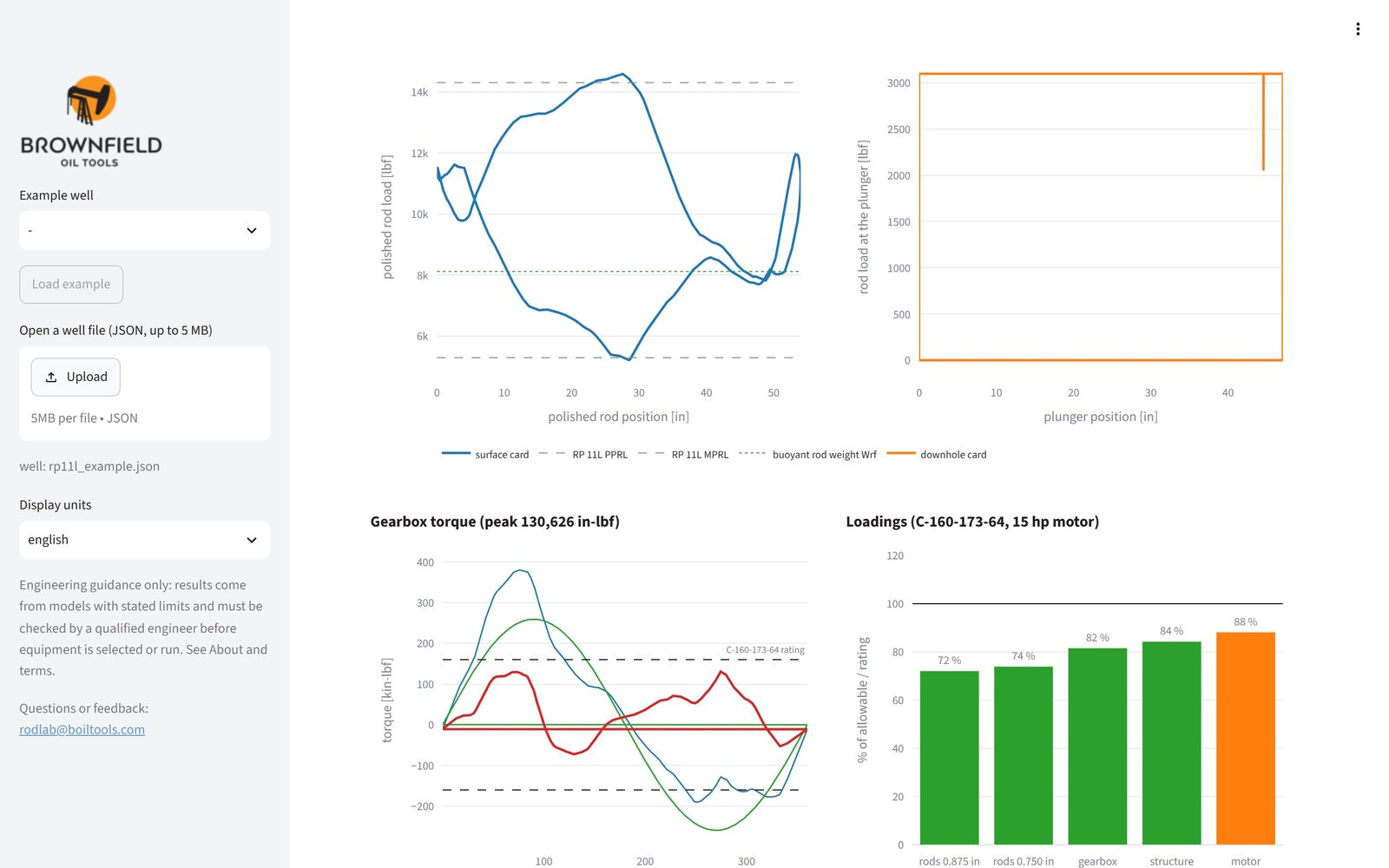
The RP 11L tab runs the classic API RP 11L design for the current well. Click Run the API RP 11L design. The figure shows:
- Idealised surface card: the RP 11L load envelope against polished rod position, with the static loads and the counterbalance effect (CBE).
- Loadings: rods, gearbox, structure and motor as a percentage of their rating or allowable. Green bars are up to 85 %, orange up to 100 %, red over 100 %.
- Operating point on RP 11L Fig. 4.2: where the well sits on the published chart (N/No and Fo/Skr).
- Rod loading per taper: the Goodman loading of each rod size.
- Summary: the RP 11L figures (Sp, PD, PPRL, MPRL, PT, PRHP, CBE), the rod string, and each rule of the grade with its result.
Text report opens the same results as plain text, to copy into your own documents.
What-if
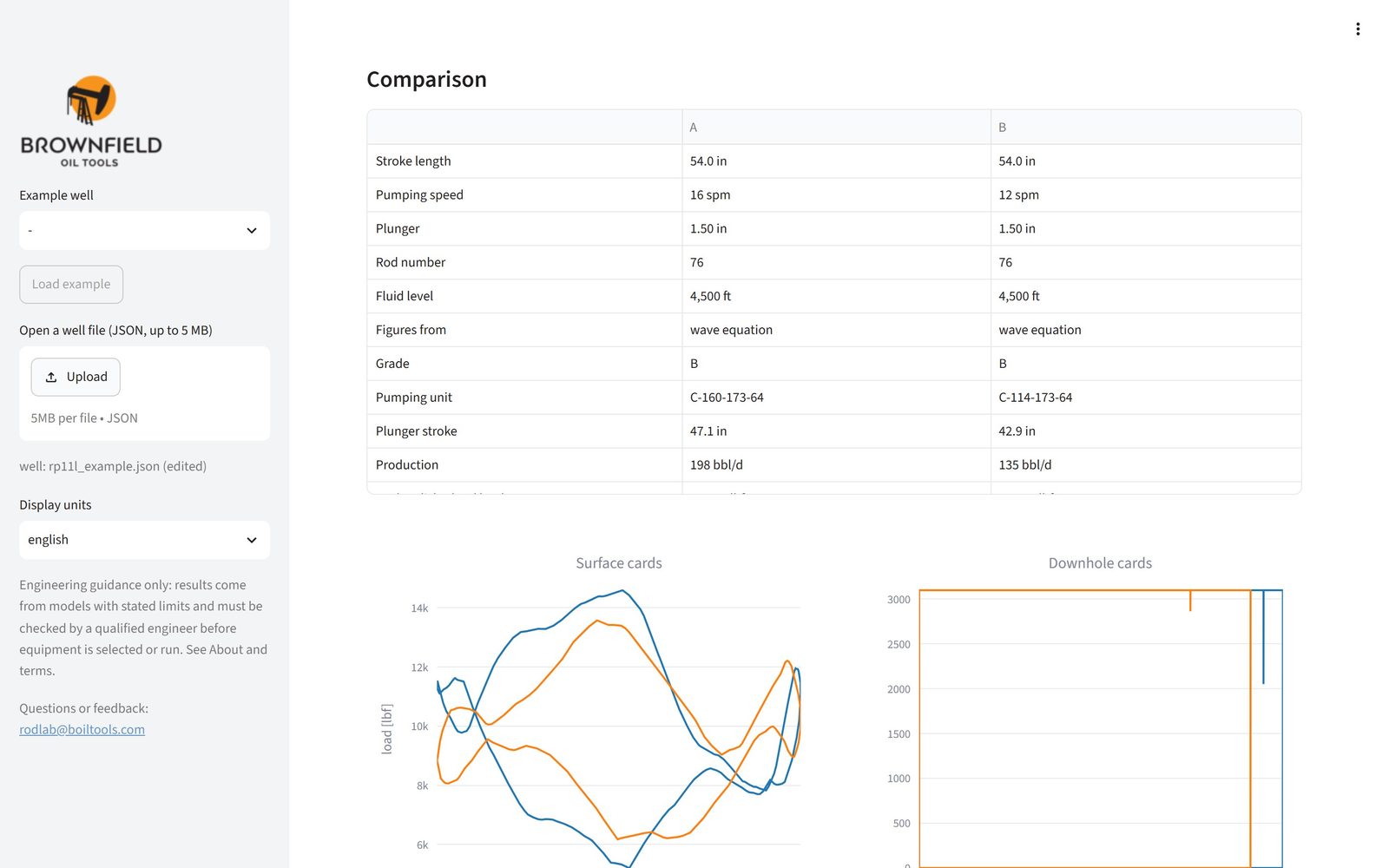
The What-if tab answers "what happens if I change this?". Move the sliders for stroke length, pumping speed, plunger, API rod number or fluid level: the RP 11L grade, production, PPRL, peak torque and the rod, gearbox and structure loadings follow at once.
- Simulate (wave equation) runs the full simulation of the case and draws its cards.
- Pin for comparison keeps the case (A, B, C, D): up to four cases appear side by side in a table, and the cards of the simulated ones are overlaid. Clear the comparison starts again.
- Open in the other tabs makes the case the current well.
Simulation and report
The Simulation and report tab solves the damped wave equation along the rod string for the current well. It is more accurate than RP 11L, especially for deep wells, fast pumping, fiberglass rods, deviated holes and incomplete pump fillage. Click Simulate; tick Couple the crank speed to the motor to let the crank slow down and speed up with the load, as a real motor does (speed-coupled drive).
- Grade, production, rod and gearbox loading at the top, then numbered recommendations where a rule is not met.
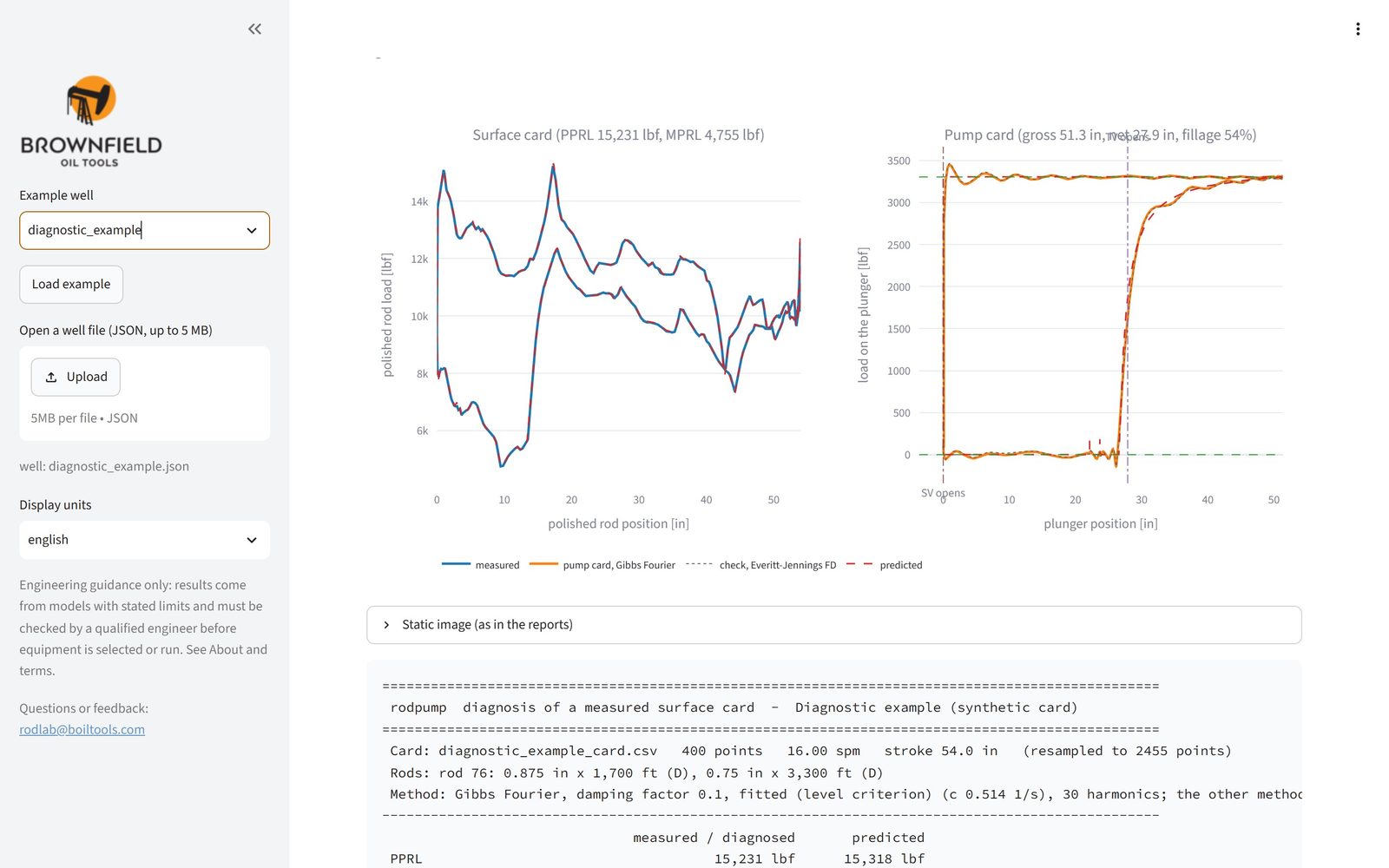
- Dynamometer cards: the surface card (polished rod) and the pump card (at the plunger). The shape of the pump card shows the pump fillage, fluid pound and gas interference.
- Gearbox torque over the cycle against the gearbox rating, and the loadings of rods, gearbox, structure and motor.
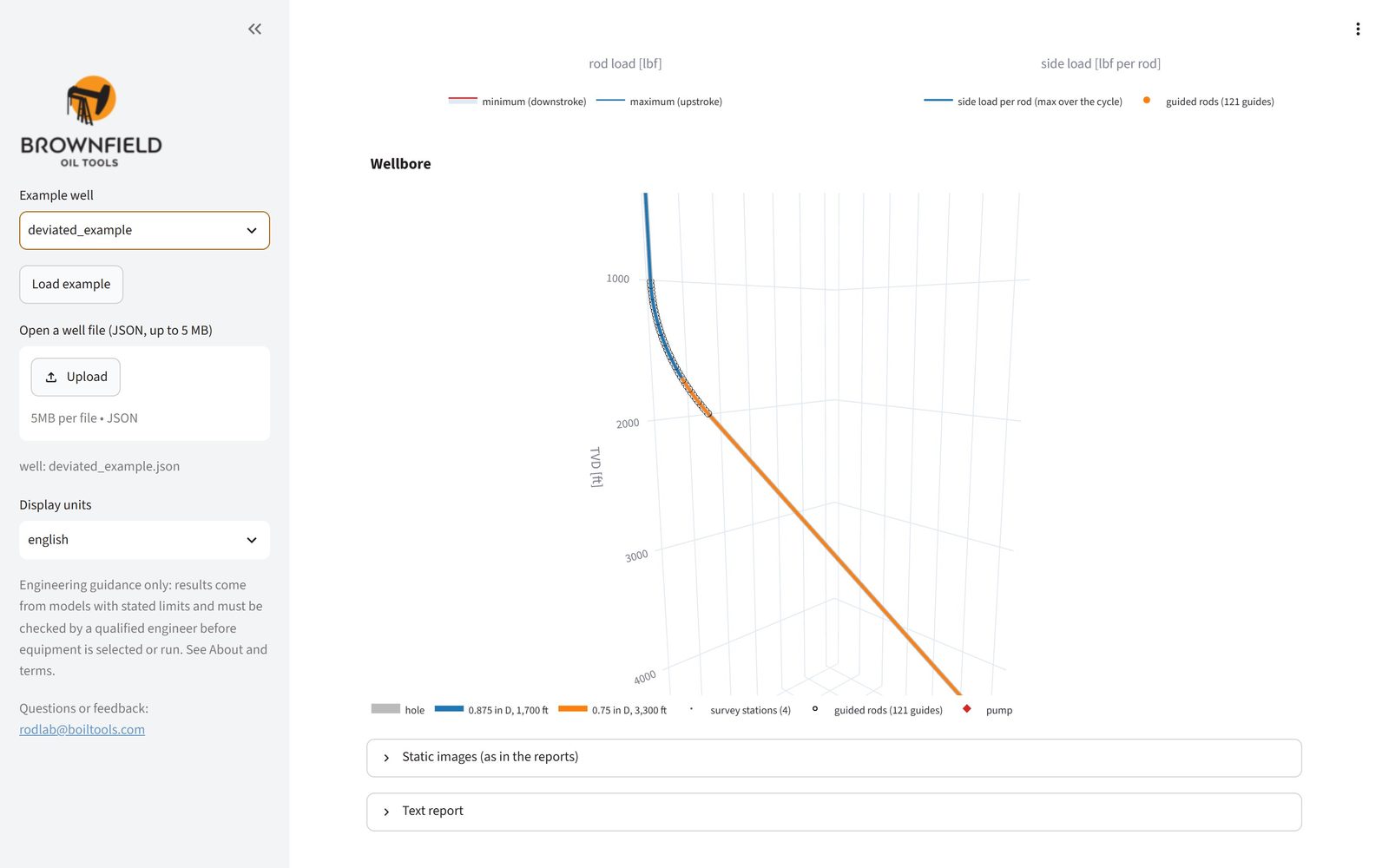
- Rod load along the string and, in deviated wells, the side load per rod and a 3D view of the well.
- Download the PDF report gives a printable report (see Reports).
The charts are interactive: hover for values, drag to zoom, double-click to reset, and use the camera icon to save a picture.
4Grades A to F
Every design gets a grade from A (comfortably within limits) to F (fails). Each rule gets its own grade and the overall grade is the worst of them, so one overloaded component is enough to lower it. The rule that sets the grade is listed with a recommendation.
RP 11L and simulation loadings (percent of the allowable or rating)
| Rule | A | B | C | D | F |
|---|---|---|---|---|---|
| Rod loading, steel rods (Goodman, API RP 11BR) | ≤ 80 | 80–90 | 90–100 | 100–115 | > 115 |
| Rod loading, fiberglass rods (simulation) | ≤ 80 | 80–90 | 90–100 | 100–110 | > 110 |
| Gearbox loading (peak torque / rating) | ≤ 85 | 85–95 | 95–100 | 100–115 | > 115 |
| Structure loading (PPRL / rating) | ≤ 85 | 85–95 | 95–100 | 100–115 | > 115 |
| Motor loading (simulation) | ≤ 85 | 85–95 | 95–100 | 100–115 | > 115 |
Other rules
| Rule | Grade |
|---|---|
| Minimum polished rod load (MPRL) | F when it is negative: the rods would go into compression at surface. |
| Speed ratio N/No' (RP 11L) | C above 0.45, F above 0.6: too fast for the rod string, outside the RP 11L charts. |
| Production | Lowered by how far the production falls short of the target rate. |
| Pump fillage (simulation) | A from 90 %, B from 75 %, C from 50 %, D from 25 %, F below. |
| Crank speed variation (speed-coupled drive) | A up to 15 %, B 25 %, C 35 %, D 50 %, F above. |
| Side load per rod (deviated wells) | A up to 50 % of the limit (default 100 lb per 25 ft rod), B 75 %, C 100 %, D 150 %, F above. |
| Rod-tubing friction loss (deviated wells) | A up to 10 % of the polished rod power, B 20 %, C 30 %, D 45 %, F above. |
5Design search
The Design search tab is the full version of the quick design, with the options in your hands. RodLab screens every combination of tubing, plunger, rod number, stroke, speed and pumping unit with RP 11L, then simulates the best of them with the wave equation and ranks them.
| Option | Meaning |
|---|---|
| Target rate | In the well file's units; 0 uses the target rate of the well file. |
| Slowest and fastest speed | The range of pumping speeds to try, in strokes per minute. |
| Candidates simulated | How many of the best screened designs get the wave-equation simulation (1 to 20). More is slower. |
| Motor loading limit | The highest motor loading allowed when the motor is sized, in percent. |
| Taper lengths | api: the taper lengths of RP 11L Table 4.1; equal_goodman: lengths that load every taper equally on the Goodman diagram. |
| Sinker bars where the rods buckle | Adds sinker bars at the bottom of the string when the simulation finds the lower rods in compression. |
| Tubing sizes | Comma separated, for example 2-3/8, 2-7/8; empty uses the well's tubing. |
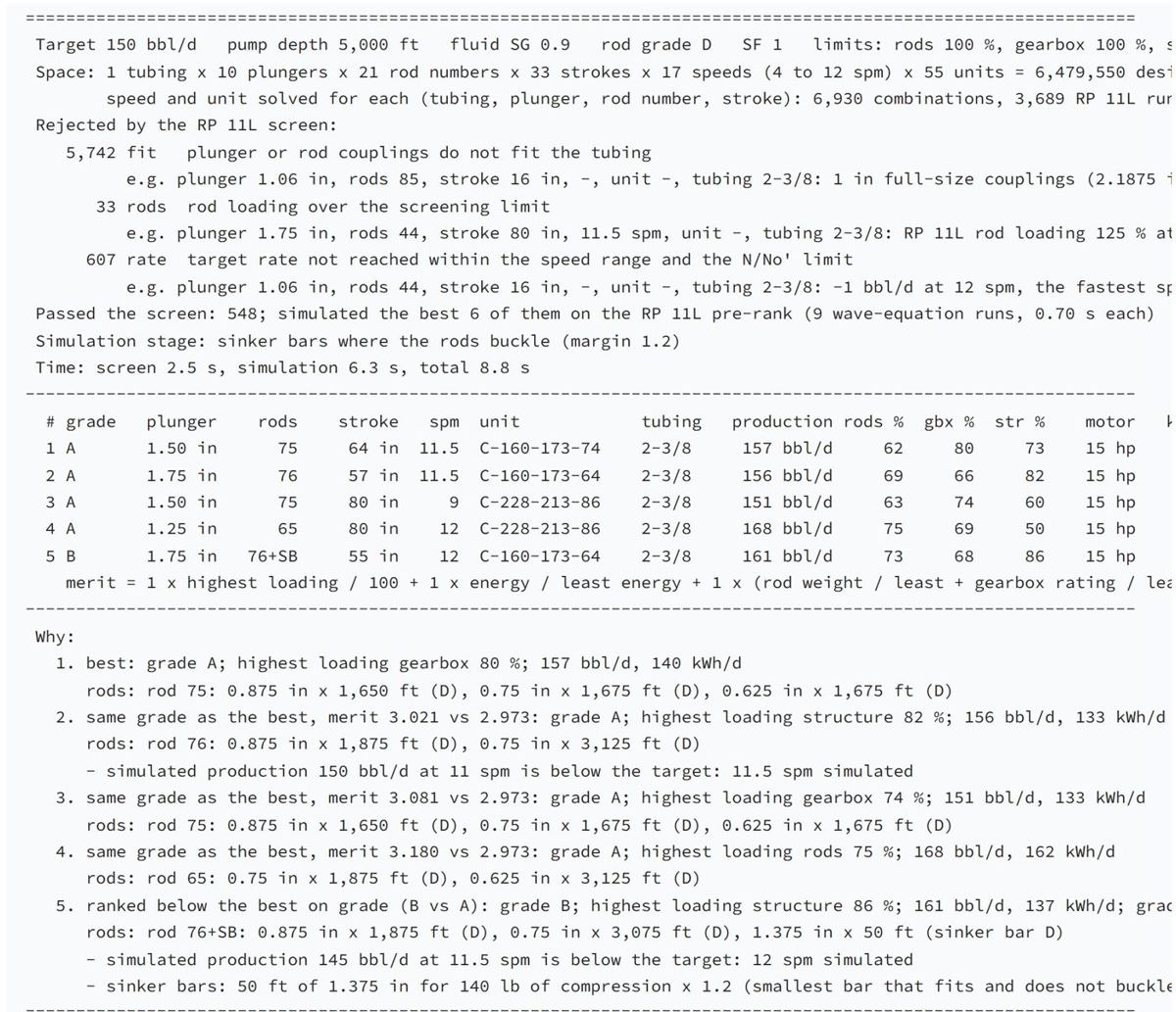
Click Search designs. The report explains the search:
- Space: how many designs were possible and how many RP 11L runs were needed.
- Rejected by the RP 11L screen: how many failed and why (plunger or couplings do not fit the tubing, rods overloaded, target rate not reached), each with an example.
- The ranked table: grade, plunger, rods, stroke, speed, unit, tubing, production, rod, gearbox and structure loadings, motor and energy. Designs are ranked by grade, then by a merit figure that adds the highest loading, the energy use and the size of the equipment, each against the best candidate; lower is better.
- Why: for each design, why it ranks where it does.
As with the quick design, you can download the best design as a well file or open it in the other tabs.
6Deviated wells
In a deviated or directional well the rods rub on the tubing. RodLab models the hole from the survey, adds the Coulomb friction between rods and tubing to the wave equation, and reports the side load on every rod, so you can see where rod guides are needed.
- Enter the deviation survey in the Well section of the Well file tab: one station per line of
measured depth, inclination (degrees from vertical) and azimuth (degrees from north), for example
[[0,0,0],[1000,0,0],[2000,30,45],[5000,30,45]]: vertical to 1,000 ft, built to 30° at 2,000 ft, then straight to the pump. - Pump depth and fluid level are measured depths. RodLab uses the true vertical depth from the survey for the fluid column and the lift.
- Set the rod-tubing friction coefficient under Rods (0.2 by default) and, with Show all inputs, the rod guides and the side-load limit.
- Run the Simulation and report: it adds the side load chart, the friction loss and a 3D view of the well with the rod tapers, the guided rods and the pump.
The deviated_example well in the sidebar is the RP 11L example in such a hole.
7Diagnostics
The Diagnostics tab works the other way round: from a measured surface card (a dynamometer card from the well) it computes the pump card at the plunger and tells you what the pump is doing. The current well file must describe the well the card comes from (rods, pump depth, fluid).
The card file
- CSV or plain text, up to 5 MB, with one point per line: position and load, and optionally time.
- A header line is optional. Columns are recognised by name (position, pos or displacement; load or force; time), and
units in the header are read, for example
Position (in)orLoad [kN]. Without units, inches and pounds are assumed. - Without a header, the first two numeric columns are position and load, and a third is time.
- Lines starting with
#are comments. A last point that repeats the first (a closed card) is dropped.
# Synthetic surface card (lines starting with # are ignored)
Time (s),Position (in),Load (lb)
0.00000,0.0000,9788.61
0.00856,0.0036,10402.46
0.01833,0.0166,11314.61
...
To try it, tick Use the synthetic example card and load the diagnostic_example well from the sidebar.
Diagnose
- Method: fourier (Gibbs' Fourier-series solution of the wave equation) or fd (finite differences, after Everitt and Jennings). Both give the pump card; try the other one when a card looks odd.
- Fit the damping to the card estimates the damping from the card itself instead of the well file value.
- Overlay the predicted cards draws the cards the simulation predicts for the well file, next to the measured ones.
Click Diagnose. The pump condition grade and the report check the pump card for:
- Fillage, and whether a short fill is fluid pound (the load falls sharply when the plunger hits the liquid) or gas interference (it falls gradually as the gas compresses);
- upstroke leak: the load falling while the plunger rises (a leaking traveling valve or plunger);
- pump tagging: a load spike at the bottom of the stroke (the plunger hits the standing valve);
- not lifting: a fluid load far below the expected one (gas locked, worn or unseated pump, parted rods);
- compression at the pump (plunger friction, a sticking pump), with the sinker bars that would carry it;
- tubing movement of an unanchored string, for information.
Fit the model to the card
Choose the inputs to adjust (fluid level, damping, pump friction, gas fraction, stuffing box friction, friction coefficient) and click Fit the model to the card. RodLab changes them until the simulated surface card matches the measured one (up to 40 simulations), shows the fit and offers Download the fitted well file: a well file that reproduces the well as it runs today, a good starting point for a redesign.
8Reports, units and your data
Reports
- PDF report: from the Simulation and report tab. A summary page with the design, results and grade, the recommendations, and the charts (cards, torque, loadings, rod load, and the wellbore for deviated wells).
- Text reports: under Text report in the RP 11L and simulation tabs, and the reports of the design search and the diagnosis, to copy as plain text.
- Static images: the pictures used in the reports, to save with a right-click.
- Well files: download the current well, the best design or the fitted well as JSON, and load them again later.
Units
Choose the display units in the sidebar. They change the results and reports, not the well file: the form and the file keep the file's own unit system.
| Quantity | english | si | canadian |
|---|---|---|---|
| Depth, length | ft | m | m |
| Stroke | in | m | m |
| Plunger diameter | in | mm | in |
| Load | lbf | kN | daN |
| Torque | in-lbf | kN·m | kN·m |
| Power | hp | kW | kW |
| Rate | bbl/d | m³/d | m³/d |
| Pressure | psi | kPa | kPa |
Your data
RodLab has no accounts and stores nothing. The well you work on lives only in your browser session: when you close the tab or reload the page it is gone, and the app starts again from the example. Download the well file to keep your work. Uploaded files are read for the calculation and not saved.
9Troubleshooting
| You see | What to do |
|---|---|
| the server is busy with … other calculation(s); try again in a minute | RodLab runs a few calculations at a time for everyone. Wait a minute and click the button again. |
| … MB is over the 5 MB limit of this server | Uploads are limited to 5 MB. Well files are a few kB; for a card file, drop points (a few hundred per stroke are enough). |
| not applied: … | A value on the Well file form was not accepted; the message names it. Correct it and apply again. |
| An error when loading a well file | The file is not a valid well file; the message names the field. A well file is a JSON object like the example in section 2. |
| No design reaches the target with the allowed units and speeds | Lower the target rate, or widen the speed range or the tubing sizes in the Design search tab. |
| no card: upload one or use the example | Diagnostics needs a card: upload one or tick the example card. |
| A diagnosis that makes no sense | Check that the well file matches the well of the card (rods, pump depth, plunger), the units of the card, and try the other method. |
| Grade C or F because of N/No' | The pumping speed is too high for the rod string: slow down and lengthen the stroke. |
| Grade F because of a negative MPRL | The rods would go into compression at surface: slow down, or use a heavier rod string or sinker bars. |
| The page shows Connecting or goes blank | The connection to the server dropped (for example during an update). Reload the page; download your well file regularly to keep your work. |
| Numbers look wrong by a large factor | Check the well file's unit system (Well file tab) against the units you entered, and the display units in the sidebar. |
Still stuck, or found a mistake? Write to rodlab@boiltools.com. Please do not send confidential well data by e-mail unless you mean to.
10Glossary
- API RP 11L
- The American Petroleum Institute's recommended practice for the design calculations of sucker rod pumping systems: a method from dimensionless charts, the classic hand calculation.
- API RP 11BR
- The recommended practice for the care and handling of sucker rods; it gives the modified Goodman diagram for the allowable rod stress.
- API Spec 11E
- The specification for pumping units: their geometry and the ratings in the unit designation.
- CBE (counterbalance effect)
- The polished rod load the counterweights balance; ideally about the average of the upstroke and downstroke loads.
- Damping factor
- The share of energy the fluid and friction take out of the rod string's vibration in the wave equation; 0.1 by default, and it can be fitted to a measured card.
- Dynamometer card (surface card)
- The polished rod load plotted against the polished rod position over one stroke, as measured at the well or computed by the simulation.
- Fillage
- The share of the pump barrel filled with liquid on the upstroke. Below 100 % the pump fills partly with gas, or with nothing (pumped off).
- Fluid level
- The depth of the liquid surface in the casing annulus while the well produces; it sets the pump intake pressure.
- Fluid pound
- The plunger striking the liquid in a partly filled barrel on the downstroke; it shocks the rods and the pump.
- Fo
- The differential fluid load on the full plunger area.
- Fo/Skr
- The fluid load over the load that would stretch the rod string by the polished rod stroke (S × kr). With N/No, the input to the RP 11L charts.
- Gas interference
- Free gas entering the pump; on the pump card the load falls gradually on the downstroke as the gas compresses.
- Goodman loading
- The highest rod stress as a percentage of the allowable stress of the modified Goodman diagram (API RP 11BR), for the rod grade and the service factor. Above 100 % the rods are overloaded.
- Inflow model
- How the reservoir delivers fluid: a productivity index (PI, straight line), Vogel or Fetkovich. With one, RodLab solves the fluid level from the rate.
- Measured depth (MD) and true vertical depth (TVD)
- Depth along the hole, and depth straight down. They differ in deviated wells.
- MPRL (minimum polished rod load)
- The lowest load on the polished rod during the stroke. It must stay positive.
- N/No and N/No'
- The pumping speed over the natural frequency of a straight rod string (N/No), and of the tapered string (N/No'). High values mean the rods cannot follow the surface motion well.
- PD (pump displacement)
- The volume the plunger sweeps per day: plunger area × plunger stroke × speed, before volumetric efficiency.
- Pump card (downhole card)
- The load on the plunger against the plunger position. It shows directly what the pump is doing.
- PPRL (peak polished rod load)
- The highest load on the polished rod; it loads the rods and the unit's structure.
- PRHP (polished rod horsepower)
- The power delivered to the rod string at the polished rod.
- PT (peak torque)
- The highest torque on the gearbox over the cycle; compared with the gearbox rating.
- Rod number
- The API name of a rod string: the first digits give the largest rod and the last digit the smallest, in eighths of an inch. 76 is a 7/8 in and 6/8 (3/4) in string; 86 a 1, 7/8 and 3/4 in string.
- Rod guides
- Plastic guides moulded on the rods to keep them off the tubing where the side load is high.
- Service factor
- A factor below 1 that reduces the allowable rod stress for corrosive fluids.
- Side load
- The force pressing a rod against the tubing in a deviated well, usually given per 25 ft rod.
- Sinker bars
- Heavy bars at the bottom of the rod string that keep the rods above them in tension.
- Skr
- The load needed to stretch the whole rod string by the polished rod stroke length (stroke S times the spring constant kr).
- Sp (plunger stroke)
- The stroke of the plunger at the pump, shorter or longer than the surface stroke because of rod and tubing stretch and overtravel.
- Taper
- One section of a rod string with a single rod size. Tapered strings have the largest rods at the top.
- Unit designation
- The API name of a pumping unit, for example C-228-213-86: geometry (C conventional, M Mark II, A air balanced), gearbox rating in thousands of in-lb, structure rating in hundreds of lb, and the longest stroke in inches.
- Wave equation
- The damped wave equation of the rod string (after Gibbs), which RodLab solves to simulate the stress waves along the rods and compute the surface and pump cards.